Step-by-step guide
How to join a circle with an invite link or code
If you have been invited to a khatam (khatm) or a dhikr goal, you are in the right place. If you have the app, tapping the link is enough. If not, you download the app and join with the invite code. You can also join a one-time circle from your browser.
Short code: T4X6RC9:40
Tap the link, tap Join, type your name. You are in the circle.
In short
- If you have the app, tap the link in the message. When the invite card opens, tap Join.
- If this is your first time, type your name and tap Continue. No email or password is asked for.
- If you have the app but the link opens in the browser, tap the Open App button on the page (in a one-time circle, Open in the app).
- If you do not have the app, download it first. Then tap Join with an invite code in the Circles tab, paste the link or the code and tap Join.
- The link of a one-time circle often opens without the app too: in the browser you take the pages you will read, or you add to the count.
- Your task appears under Your Tasks on Home.
If you have the app on your phone
An invite usually arrives as a link by WhatsApp or SMS. Under the link there is often a short six-character code as well.
-
1
Tap the link in the message
Tap the link in the message. The app opens on its own and shows the invite card. At the top of the card it says Invitation, and below that is the circle's name. For a one-time circle, the top of the card says One-Time Circle.
If you do not want to join right now, you can tap Skip for now. The link stays in the message; you can tap it again later.
If the link opens inside WhatsApp or Instagram, you may see a web page instead of the app. Tap the Open App button on that page (in a one-time circle, Open in the app). The invite card opens in the app.
9:41OOmarJoin the circle My Family on Manevi Halka: https://manevihalka.app/join.html?code=T4X6RC
Short code: T4X6RC9:40INVITATION My Family Join this circle to take part in its tasks. Join Skip for now -
2
Tap Join and type your name
Tap Join. If you are using the app for the first time, the What's your name? card appears. Type your name and tap Continue. The others in the circle will see you by this name.
In a regular circle, the Welcome window comes next; tap OK and the circle's screen opens. In a one-time circle, the circle's screen opens straight away.
You do not need to open an account to join. No email, password or phone number is asked for; typing your name is enough.
If you have already joined this circle, tapping Join takes you straight to the circle's screen.
9:41INVITATION My Family Join this circle to take part in its tasks. Join Skip for nowMy FamilyCreated 5 Oct 2026 • 6 membersReadingsMembers (6)QURAN READINGFamily Khatm30 juzActiveWhat's your name?Your circle will see you by this name. No email needed. Your nameContinueCancelWelcome You joined My Family. You can see readings and members here.OK
If you do not have the app
When you tap the link of a regular circle, the invite page opens in the browser. After you download the app, the invite does not arrive on its own: tap the link in the message once more, or enter the code in the app. So note down the code first. The link of a one-time circle, on the other hand, often opens the circle's own page (step 7 below).
-
3
Note the code on the invite page and download the app
On the page you see a six-character code in the Invite Code box, for example T4X6RC. Write the code down somewhere, or keep the message.
Then tap the App Store or Google Play button and download Manevi Halka. Downloading the app and joining a circle are free.
The code is often in the message too: the Short code line under the link is the same code.
9:41OOmarJoin the circle My Family on Manevi Halka: https://manevihalka.app/join.html?code=T4X6RC
Short code: T4X6RC9:40manevihalka.app Manevi Halka
Join the Circle
Open the app, or install it below.
Invite CodeT4X6RCOpen App Don’t have the app yet?App StoreGoogle Play
Manevi Halka
Join the Circle
Open the app, or install it below.
Invite CodeT4X6RCOpen App Don’t have the app yet?App StoreGoogle Play -
4
Open the Circles tab in the app
Open the app and finish the short introduction on first launch. Tap the Circles tab in the bar at the bottom. Then tap the Join with an invite code button.
The app only asks for your name. Type your name and tap Continue. The Join Circle screen opens next.
If you have typed your name in the app before or signed in, you will not see this button. In that case tap the + button at the top right. In the panel that opens, tap the Join a Circle row.
9:41Circles for worship together- Invite family and friends with an invite link
- Track your circle's progress together
Join CircleHave an Invite Code? Paste the invite code you received from a friend.Paste invite link or code PasteJoinWhat's your name?Your circle will see you by this name. No email needed. Your nameContinueCancel -
5
Paste the link or the code, then tap Join
In WhatsApp, press and hold the invite message and copy it. Then go back to the app and tap the Paste button. If your phone asks for permission to paste, allow it. The app finds the code inside the message by itself. You can also type the code by hand.
Then tap Join. The circle's screen opens straight away.
You can paste the whole link, or even the whole message, into the box. The code is recognised even if it is written with spaces in between.
If the code does not match, the app says: No circle found with this code. Check the code. In that case read the code again. Codes do not use the letters I and O or the numbers 0 and 1.
9:41Join CircleHave an Invite Code? Paste the invite code you received from a friend.Paste invite link or code PasteJoinMy FamilyCreated 5 Oct 2026 • 6 membersYou have successfully joined "My Family".ReadingsMembers (6)QURAN READINGFamily Khatm30 juzActive
With a QR code or from the browser
An invite can be shown on a screen at the mosque or at a gathering. And you can join a one-time circle even without the app.
-
6
Scan the QR code with your phone's camera
Someone in the circle, usually the admin, opens the Invite to Circle window on their phone. It has a QR code. Open your own phone's camera and point it at the QR code.
Tap the link that appears on the screen. If you have the app, the invite card opens; tap Join. If you do not have the app, the invite page opens; carry on from step 3 above.
The QR code is in the invite window of regular circles. One-time circles use the link or the code.
9:41manevihalka.appINVITATION My Family Join this circle to take part in its tasks. Join Skip for now -
7
Join a one-time circle from your browser
The link of a one-time circle, such as a khatam for someone who passed away, a khatam for a blessed night or a group salawat, often opens without the app as well, and the circle's page appears in the browser. You need no account and no app. If the page only shows the Invite Code and the store buttons, this link needs the app; carry on from step 3.
For a khatam, tap Take this. At the question How much will you read?, choose how many pages you will read and tap I confirm, I will take it. Then Read now opens your pages in the browser. For a dhikr or salawat goal, tap Add to the count, tap the circle as many times as you counted, and at the end tap Add my count.
Everyone reads or recites in their own place; the page only shares out the parts and adds up the counts. For some circles, the page only shows the circle; then you need the app to join. More details: One-time circle and Group dhikr and salawat.
A relative of yours without the app can often tap the link and take their share in the browser too.
If you have the app and this page opened, tap the Open in the app button at the very bottom and tap Join in the app. That way the shares you take from now on are saved to your own account and appear under Your Tasks.
9:41manevihalka.appIntention of this recitationFor our late grandfather Family KhatmUntil 12 OctoberThe recitation is in progress100 completed20 undertaken484 availableNext portionJuz 720 pages available Take thismanevihalka.appPages 121-14020 pages How much will you read?5101520Do you confirm that you will read this portion? I confirm, I will take it Cancelmanevihalka.appPages 121-140 are entrusted to you. May Allah accept it. Read now
After you have joined
The circle's screen has two tabs. The Readings tab shows the circle's tasks, and the Members tab shows the others in the circle.
-
8
Find your task on Home
When a task is assigned to you, a card appears under Your Tasks in the Home tab. The card shows the circle's name and the juz assigned to you.
Tap the card to open the task screen. If you allowed notifications, you also get a notification on your phone when your new task is ready; for a round that starts at night, the notification arrives in the morning.
9:41Assalamu alaykum,AishaYour TasksCircle: My FamilyFamily KhatmJuz 2Progress: 0/47 days leftFamily KhatmRound 1 • 7 days left0 / 30 juz • 5 membersCircle Progress0 / 30 juzMy TaskCircleYOUR TASK Juz 2 Start ReadingWeekly targets0/4COMPLETEAsk for HelpExcuse -
9
If a khatam is running, your share comes in the next round
If the circle has a khatam running and you joined in the middle of a round, the task screen shows this message: No task assigned to you this round. This is not an error.
The juz are handed out to whoever is in the circle when a round starts. In the next round you are on the list too, and your share arrives on its own. Tasks such as a dhikr goal show up under Your Tasks straight away.
If you do not want to wait and there is a share waiting in the pool, the See the pool link appears at the bottom. You can take a share from there if you like.
9:41My FamilyCreated 5 Oct 2026 • 6 membersReadingsMembers (6)QURAN READINGFamily Khatm30 juzActiveFamily KhatmRound 3 • 4 days leftCircle Progress10 / 30 juzMy TaskCircleYOUR TASKNo task assigned to you this round.Your share will come with the next round.
What it looks like in the app
These screenshots are from the app itself.
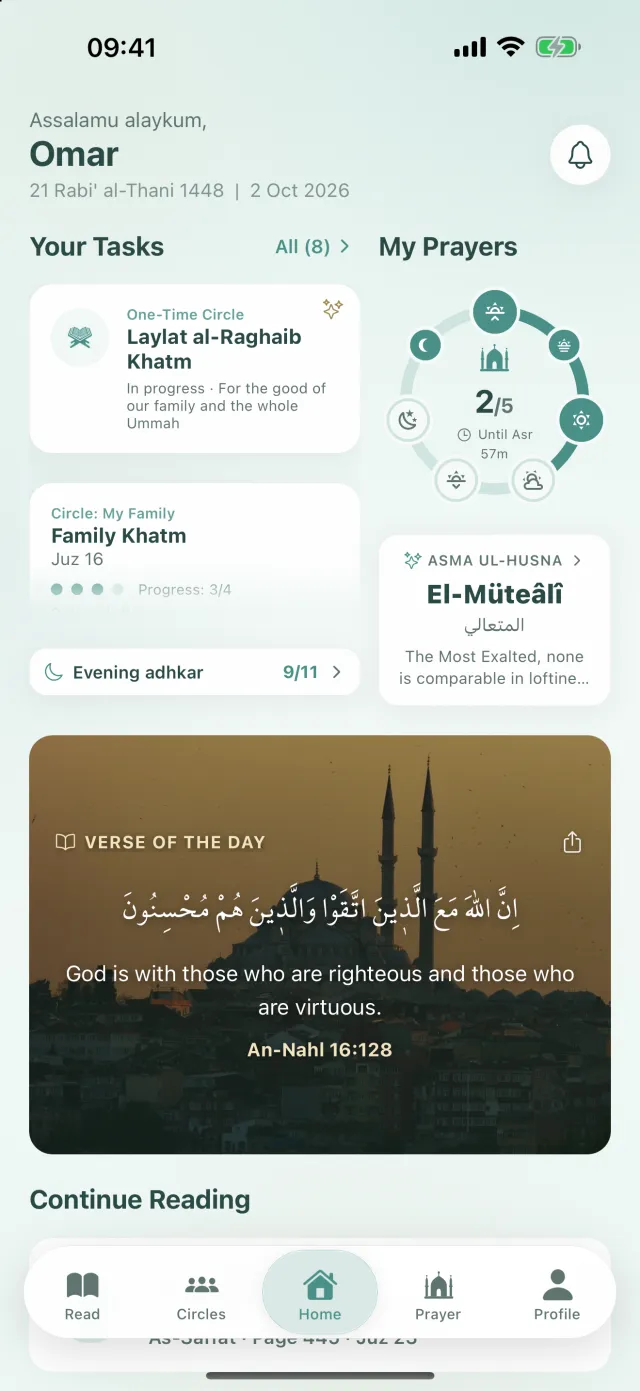
Home: your tasks 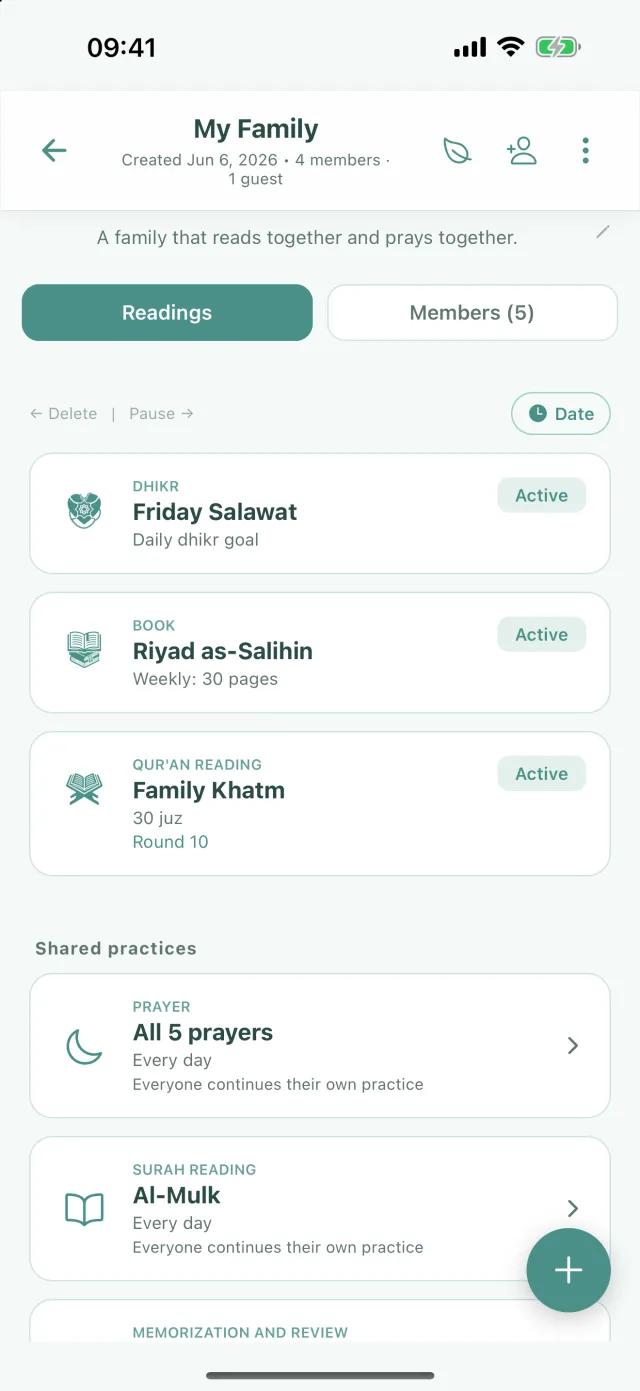
Circle screen: the circle's tasks 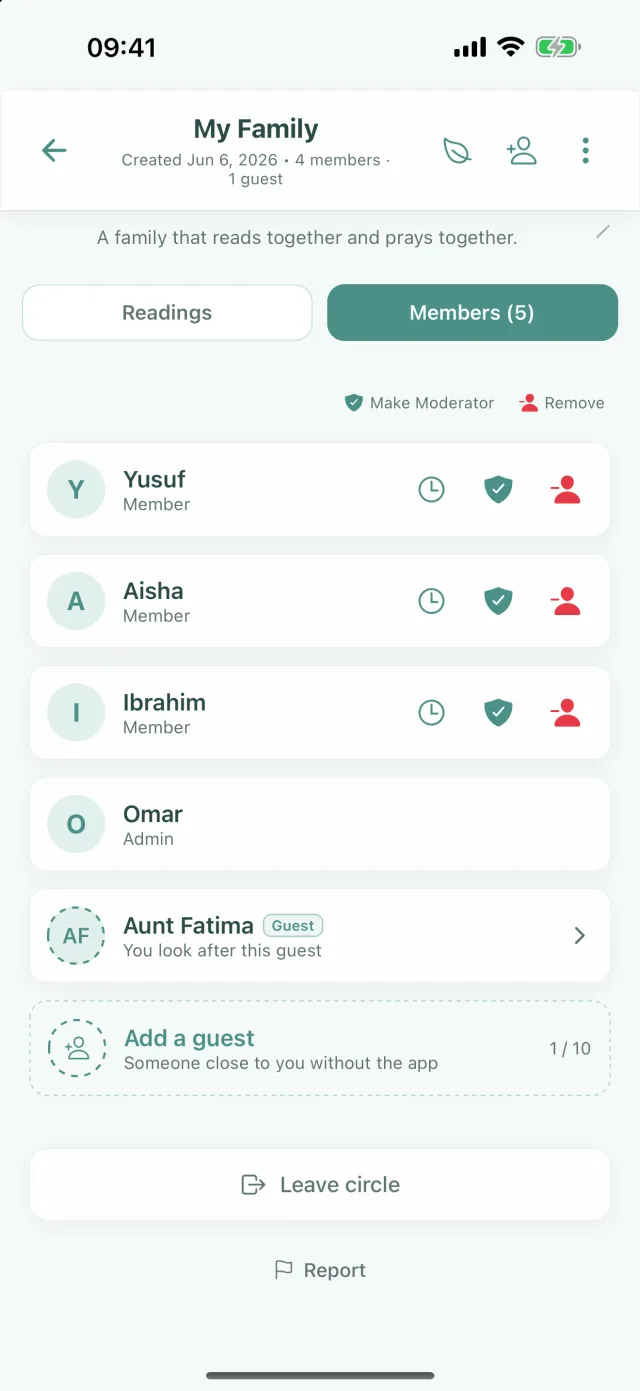
Members tab (as the admin sees it): a guest member and Leave circle 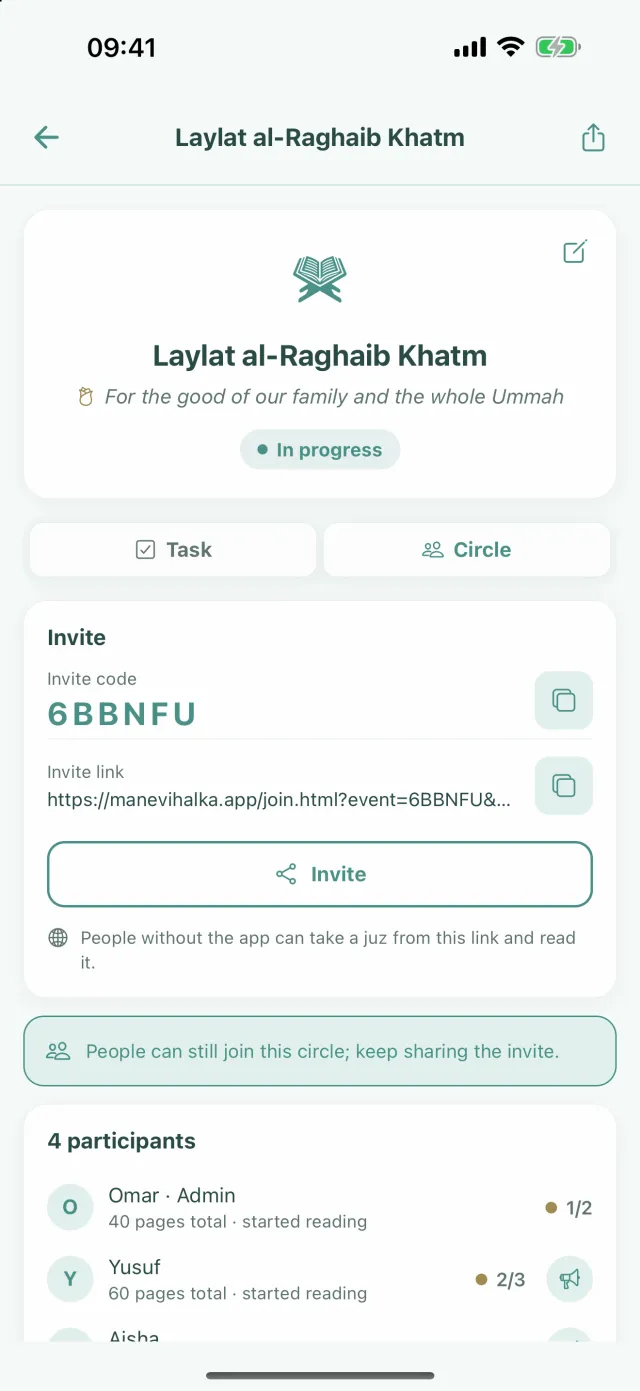
One-time circle: the link opens without the app too
Frequently asked questions
I tapped the invite link. What happens now?
If you have the app on your phone, the app opens and shows the invite card; you tap Join. If you do not have the app, the invite page opens in the browser. It has the invite code and buttons to download the app. The link of a one-time circle, on the other hand, often opens the circle's own page in the browser. If the page only has the Invite Code and the store buttons, that circle needs the app; carry on from step 3.
I got a short code. Where do I type it?
In the app, open the Circles tab and tap Join with an invite code. If you do not see this button (because you typed your name before or signed in), tap the + button at the top right and tap the Join a Circle row. Type the code in the box and tap Join.
Can I join without downloading the app?
For a one-time circle, often yes: the link opens in the browser, and you take a juz or add to the count. For a regular circle you need the app. An older relative without a smartphone can be added by the admin as a guest; the person chosen to look after them, or the admin, marks their Quran share.
Do I need to open an account?
No. The app only asks for your name; it does not ask for an email, password or phone number. If you like, you can later tap the Your circles live only on this device. Secure your account strip at the top of the Circles screen and link your account with Apple, Google or email. Then your circles stay with you even if you change phones.
I have joined. Where do I see my task?
Under Your Tasks in the Home tab. The Readings tab on the circle's screen also lists all the circle's tasks. If you joined a running khatam in the middle of a round, your share comes with the next round.
How do I leave a circle?
On the circle's screen, tap the three dots at the top right. In the list that opens, tap the Leave circle row. The next page shows what will change. Tap Leave to leave, or Stay in the circle to change your mind. Quran shares you have not finished are released to the pool; the others in the circle can take them from there. You can join again later with the same code if you like.
The invite link or code does not work. What should I do?
If there is a problem with the link, the app says: This invite link is invalid or expired. If you tried with a code, it says: No circle found with this code. Check the code. The code may have been typed wrongly, or the circle may no longer exist. One-time circles close when their time is up. Ask the person who sent the link for a new link or code. If the circle is full, the app says: This circle has reached the maximum number of members. In that case, let the admin know.
Download the app now
Joining a circle is free. Download the app, tap the invite link and join your circle.