Manevi Halka Get the appDownload

Step-by-step guideNew

How to read 41 Yasin as a group, step by step

41 Yasin means a group reading Surah Yasin 41 times in total. Many families read it for the healing of someone who is ill, for a loved one who passed away or for a wish; the readings are shared among those taking part. The app has a ready-made template for it: you choose who it is for and until when, and send the link. Everyone reads Yasin where they are; the app only adds up the count.

  • Set up in about 1 minute
  • Yasin opens in the app
  • Free

The 41 Yasin template, who it is for, Open the circle, the invite and the circle screen.

In short

  1. In the Circles tab, tap +, then the One-Time Circle card.
  2. On the What shall we read together? screen, choose the 41 Yasin template.
  3. Choose the For whom and Until when rows, then tap Open the circle.
  4. Send the link to your family or WhatsApp group with Invite.
  5. Everyone taps Read on the circle screen, reads Yasin and taps Mark as read on the last page.
  6. When the count reaches 41, the circle completes and everyone gets a notification.
1
The person who sets up the circle

Set up the 41 Yasin circle

The circle is a one-time circle: it has a goal (41 readings) and an end. It completes by itself when the goal is reached.

  1. 1

    Choose the 41 Yasin template

    In the Circles tab, tap the + button at the top right and then the One-Time Circle card in the panel that opens.

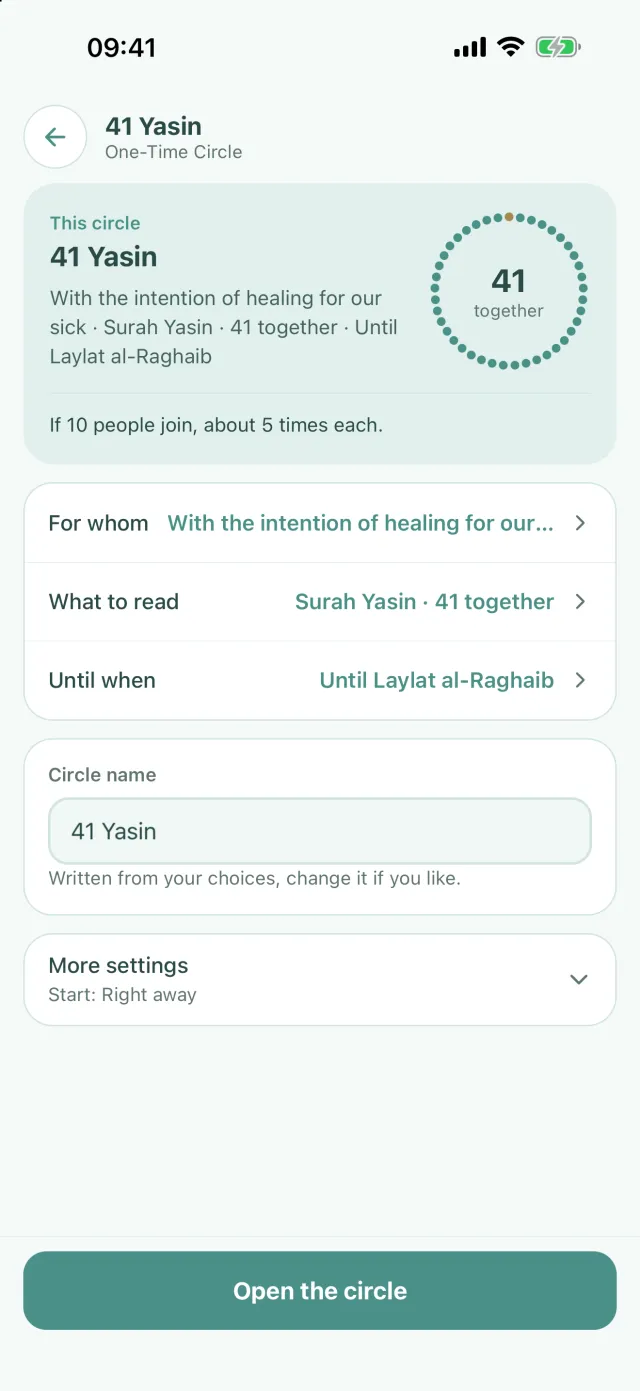
    On the What shall we read together? screen, tap the 41 Yasin tile. The summary comes ready: what is read is Surah Yasin, the goal is 41 and the count is Collective. Everyone's readings go into a single counter.

    If there is no + at the top right, tap the Start a one-time circle button in the middle; once you enter your name, the same screen opens.

  2. 2

    Who it is for and until when

    Tap the For whom row. The For healing chip writes “With the intention of healing for our sick” in the box; next to it are For a loved one who passed away and For an occasion. You can change the wording or leave it empty.

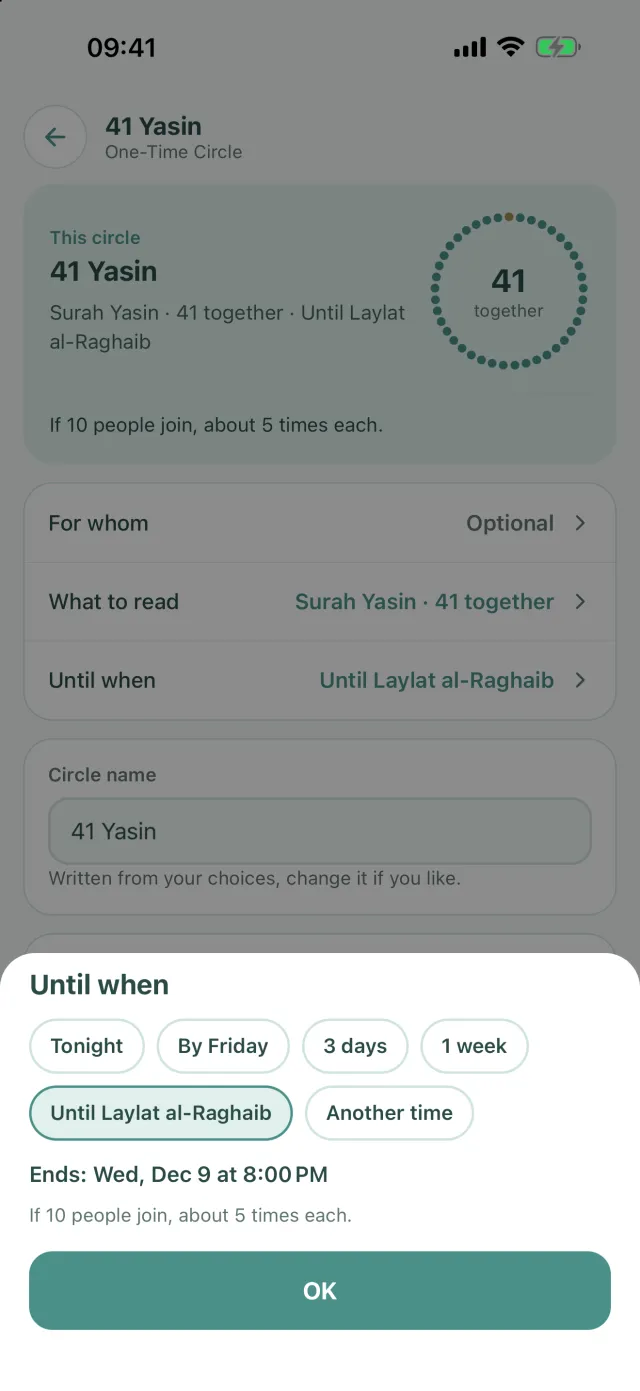
    The Until when row starts as 3 days. You can also choose Tonight, By Friday, 1 week, the next blessed night or Another time.

    The line at the bottom of the card works out each person's share: if 10 people join, everyone reads about 5 times.

  3. 3

    Open the circle and invite

    The circle's name starts as 41 Yasin; change it if you like. Tap the Open the circle button at the bottom.

    On the Your circle is ready screen, the circle has already started. Tap Invite: the message says who it is for, the circle's name, its end and the link with “Read with us on Manevi Halka:”.

    To change the goal, tap the What to read row on the summary. You can enter another number instead of 41, or choose Individual instead of Collective; then everyone reads the whole goal themselves.

2
Everyone who joins

Read your part

Everyone reads where they are; the app only adds up the count. The circle screen shows the total and your own readings.

  1. 4

    Tap Read, then mark it as read on the last page

    After you tap the link and choose Join, the circle screen opens. The top card shows who it is read for, how many readings are done and 41 beads; at the bottom you see the time left and each person's remaining share.

    Tap the Read button on your card. Yasin opens in the app's reader on its own pages; under the button you see the page range and the approximate reading time. On the last page, the Mark as read button appears. Tap it and confirm, and you're back on the circle screen with the counter one higher.

    No need to look for a mushaf: the pages of Yasin open in the app.

    If the link opens in a browser instead of the app: Join a circle with an invite.

  2. 5

    If you read from a printed copy

    If you read Yasin from your own mushaf or from memory, tap I read it from a book, mark it under the Read button and confirm. Your reading is added to the counter as one.

    If you read more than once, do the same after each reading. How many times you've read shows under your card.

    The app asks before marking, because a confirmed reading can't be taken back off the counter.

  3. 6

    Without the app: tap I read it in the browser

    On the phone of someone without the app, the link opens in the browser. The page shows the Surah Yasin line, the total and an I read it button.

    Read Yasin from your own mushaf and tap I read it once when you finish. Your reading is added to the circle's total; if you read it again, tap again.

    No account needed; the link is enough.

    This works only with a Collective count. In a circle set to Individual, the browser shows For circle members.

3
Everyone

When it reaches 41

The moment the counter reaches 41, the circle completes by itself; it doesn't matter who added the last reading.

The circle completes

All the beads on the top card fill up. If the screen is open, a short message says the circle is complete; people who closed the app get a notification.

The See the result button shows the circle's total and your own contribution. The circle is deleted 24 hours after the end; the result stays under Profile › My Journey.

If time runs short, or to read again

If the end is near and 41 hasn't been reached, the organiser chooses Extend by 24 hours from the ··· menu on the circle screen; the end moves 24 hours later and everyone keeps reading.

To read again with the same intention, the organiser taps Set up this circle again in the result. Setup opens with the same goal, name and who it is for; only the end is chosen again.

Example: 41 Yasin with the intention of healing

The screenshots below are from the app. The circle is set up “With the intention of healing for our sick” and runs until the next blessed night.

  • Summary screen: the This circle card with 41 together, For whom with the intention of healing, Until when until Laylat al-Raghaib
    Everything on one screen, with each person's share
  • Until when sheet: Tonight, By Friday, 3 days, 1 week, Until Laylat al-Raghaib and Another time
    End chips: from tonight to the next blessed night

Frequently asked questions

What is 41 Yasin?

41 Yasin means a group reading Surah Yasin 41 times in total. The readings are shared among those taking part; a few people read a few times each until 41 is reached. It is often read for the healing of someone who is ill, for a loved one who passed away or for a wish.

How do you read 41 Yasin as a group?

In the app, tap + in the Circles tab, then the One-Time Circle card and the 41 Yasin template. Choose the For whom and Until when rows, tap Open the circle and send the link. Everyone reads Yasin with the Read button on the circle screen; when the counter reaches 41, the circle completes.

Do we need 41 people?

Not in the app. The counter counts readings, not people: if 10 people join, everyone reads about 4 or 5 times. The line at the bottom of the circle card shows each person's remaining share.

How do I add a reading from my own mushaf to the counter?

On the circle screen, tap I read it from a book, mark it and confirm; your reading is added to the counter. If you read in the app's reader, the Mark as read button on the last page does the same.

Can people without the app join?

Yes. Whoever opens the link in a browser reads Yasin from their own mushaf and taps I read it; no account is needed. This works when the count is Collective.

Does it cost anything?

Setting up and joining a 41 Yasin circle is free. With a free account you can run one one-time circle at a time; when it completes or is deleted, you can set up the next.

Start your circle today

Download Manevi Halka for free, create your circle and share the invite link.

DownloadApp Store DownloadGoogle Play