
Step-by-step guideNew
How to use the Garden of Intentions: plant an intention and watch it grow
The Garden of Intentions is where you choose a small, steady step for your own worship. Each intention becomes a sapling that grows as you keep it. Only you can see your garden, and if you need a break, your garden waits for you.
A first intention: choose Qur'an reading, two pages a day, and plant your sapling.
In short
- Open the Read tab and tap the Garden of Intentions card. The first time, a short introduction opens.
- Tap Plant an intention. Pick a ready example or a deed under What you already do.
- Choose how often and at least how much you will do, then tap Continue.
- Choose your sapling, write your intention in one sentence if you like, and tap Plant.
- Take your step from the Today list each day. Pages you read, prayers you mark and dhikr you count in the app are counted on their own.
- If you need a break, use Take a break; your plants do not fade on those days.
Open your garden
The Garden of Intentions is one of the cards on the Read screen. It is for your own worship; you do not need a circle.
-
1
Open the Garden of Intentions from the Read screen
Tap the Read tab in the bar at the bottom. Find the Garden of Intentions card among the cards; since it is new, its corner says New. Tap the card.
The first time, a short three-page introduction opens. Move on with Continue; the Plant your first intention button on the last page takes you straight to planting. You can also skip it with Skip at the top.
After that, the card opens the My intentions list. To reach the garden itself, tap the picture at the top of the list where it says Enter your garden.
9:41ReadPersonalGlobalHoly QuranContinue from where you left offBookshelfCollection, your own books and your notesJawshan al-KabirMy PrayersPrayer TasbihatNewGarden of IntentionsToday's intentionsDhikr CounterHifz ChartSkip This is your Garden of Intentions.You can make the intention to set aside time for the Qur'an, to do dhikr regularly, or to leave a bad habit behind. Here, every intention becomes a sapling. Continue
Plant your first intention
Planting an intention takes three steps: which deed, how often, which sapling.
-
2
Choose the deed
Tap Plant an intention. The first screen asks For which deed? and shows three groups:
- Example intentions: three ready intentions. Tap one and its settings are filled in, so you go straight to choosing a sapling.
- What you already do: Qur'an reading, prayer, dhikr, wird, memorization, book reading, make-up prayers, make-up fasts and prayer tasbihat. If you do these in the app, the garden reads your record from there.
- A new intention: fasting, charity, reading from a printed mushaf and dua. At the bottom, Write my own lets you name your own intention.
9:41Plant an intentionFor which deed? Example intentions I will give charity every day, even if only a littleI will fast on Mondays and ThursdaysI will read two pages of the Qur'an every day What you already doReading the Qur'anPrayerDhikrWirdMemorizationReading booksMake-up prayersMake-up fastsPlant an intentionReading the Qur'anHow often?Every dayCertain daysWeeklyAt least per day2 pagesKeep it small. On days you have more time, the extra counts too. Continue -
3
Choose how often and at least how much
Under How often?, choose Every day, Certain days or Weekly. Then set the minimum step: pages for Qur'an reading, prayers for prayer, a count for dhikr. Qur'an reading starts at 2 pages a day.
Tap Continue.
Keep it small. As the screen says, on days you have more time, the extra counts too.
9:41Plant an intentionReading the Qur'anHow often?Every dayCertain daysWeeklyAt least per day2 pagesKeep it small. On days you have more time, the extra counts too. ContinuePlant an intentionYour sapling and intentionCitronSuggestedAllCitronOliveFigPomegranateYour intention (optional) For the sake of Allah, a little every day Only you can see it. Plant -
4
Choose your sapling and plant it
In the last step the sapling suggested for the deed is already selected; for Qur'an reading it is Citron. You can pick another kind from the strip below, or see them all with All.
If you like, write your intention in one sentence in the Your intention (optional) box; only you can see it. Tap Plant and your sapling takes its place in the garden.
Each sapling's card has a Reflection section: a verse or hadith that mentions the plant, or a detail of how it was created.
After your first intention, the app offers an evening reminder once: if the day's intention is not done, a short reminder comes at 21:00. You can change the time or turn it off with the Reminder icon in the garden.
9:41Plant an intentionYour sapling and intentionCitronSuggestedAllCitronOliveFigPomegranateYour intention (optional) For the sake of Allah, a little every day Only you can see it. PlantGarden of Intentions Plant an intentionYou're on a break until 28 NovemberCome back earlyToday0 of 1 doneReading the Qur'anToday 0/2Continue
Grow your garden
Below the garden sits the Today list: the intentions due today and how many are done.
-
5
Take your step from the Today list
For an intention with no counterpart in the app, charity for example, tap Done today. The row is checked and your sapling grows right there.
For an intention linked to a deed, the button says Continue and takes you to that screen: the Qur'an reader, My Prayers or Dhikr Counter. What you do there is counted on its own; you do not need to mark it again.
The garden's day turns at Fajr time (imsak). Dhikr you count or pages you read after midnight go to the previous day.
9:41Garden of Intentions Plant an intentionYou're on a break until 28 NovemberCome back earlyToday2 of 4 doneCharityToday 0/1Done todayReading the Qur'anToday 0/2ContinueMake-up prayersToday's step is doneDhikrToday's step is done -
6
Link your make-up prayers and your duas
If you choose the Make-up prayers tile under What you already do, the intention is linked to Make-up prayers: every make-up prayer you note on the same day also counts in the garden. If your tracker is not set up yet, the screen shows Set up your make-up prayers now; set it up, come back, and the intention links itself.
Make-up fasts links to Make-up fasts the same way. A dua intention counts from My dua journal: the days you pray from your journal and the days you mark that you prayed for those who entrusted you with their prayers.
For make-up prayers and dua you can also plant without setting up; then you mark the intention yourself with Done today. To set up the make-up tracker: Make-up prayers and fasts.
9:41Plant an intentionFor which deed? Example intentions I will give charity every day, even if only a littleI will fast on Mondays and ThursdaysI will read two pages of the Qur'an every day What you already doReading the Qur'anPrayerDhikrWirdMemorizationReading booksMake-up prayersMake-up fastsPlant an intentionMake-up prayersCounts from Make-up prayers: every prayer you make up, when you note it the same day.How often?Every dayCertain daysWeeklyAt least per day1 prayerKeep it small. On days you have more time, the extra counts too. Continue -
7
How your sapling grows
When you keep your intention steadily, the sapling matures in about forty days, whatever the rhythm. Every week you keep without a gap, new flowers open at its foot; after six weeks, fruit trees bear fruit.
On a day you miss, the sapling keeps its height. First it droops, and if you miss longer it fades; the day you take the minimum step, it comes back to life.
Your tree's state is told in words, like “The first flowers have opened at its foot.” or “It is bearing fruit.” The number of days in My intentions shows the days you completed and never goes down.
9:41Garden of Intentions Plant an intentionCitron · planted 1 day agoReading the Qur'anFor the sake of Allah, every day Growth Every unbroken week, new flowers open at its foot.
Take a break, pick up where you left off
Illness, travel and other times when you cannot keep up happen to everyone. The garden has a break button for that.
-
8
When you need a break
Tap the pause icon at the top of the garden; the Take a break window opens. Choose the length (Today, 3, 7, 14 or 30 days), tick the intentions to pause and tap Start break.
No reason is asked. On the days you pause, your plants do not fade; when you return, they carry on where they were. To come back early, tap Come back early above the Today list.
To pause a single intention, tap its tree and choose Pause this intention from the three dots on its card.
9:41Garden of Intentions Plant an intentionYou're on a break until 28 NovemberCome back earlyToday1 of 3 doneCharityToday 0/1Done todayReading the Qur'anToday 0/2ContinueMake-up prayersToday's step is doneTake a breakNo reason is asked and no one sees it. On the days of your break your plants don't fade; when you return they carry on where they left off. Your garden will wait for you. How long?Today3 days7 days14 days30 daysWhich intentions do you want to pause?CharityReading the Qur'anStart break -
9
The fortieth day
When you have kept an intention for forty days, that tree's moment plays in the garden and the The fortieth day card opens. It shows verse 142 of Surah Al-A'raf and a short note: the term of Musa (peace be upon him) with his Lord was completed in forty nights. For weekly intentions this moment comes in the sixth week.
9:41Garden of Intentions Plant an intentionYou're on a break until 28 NovemberCome back earlyToday3 of 3 doneCharityToday's step is doneReading the Qur'anToday's step is doneMake-up prayersToday's step is doneGarden of Intentions Plant an intentionReading the Qur'anThe fortieth dayYou have kept this intention for forty days. May Allah accept it and grant you to continue.وَوَٰعَدْنَا مُوسَىٰ ثَلَٰثِينَ لَيْلَةً وَأَتْمَمْنَٰهَا بِعَشْرٍ فَتَمَّ مِيقَٰتُ رَبِّهِۦٓ أَرْبَعِينَ لَيْلَةًAl-A'raf 7:142Forty nights appear in the Qur'an too: the term of Musa (peace be upon him) with his Lord was completed in forty nights.
What it looks like in the app
These screenshots come from the app itself. In the app, the garden is drawn as a three-dimensional tiled courtyard.
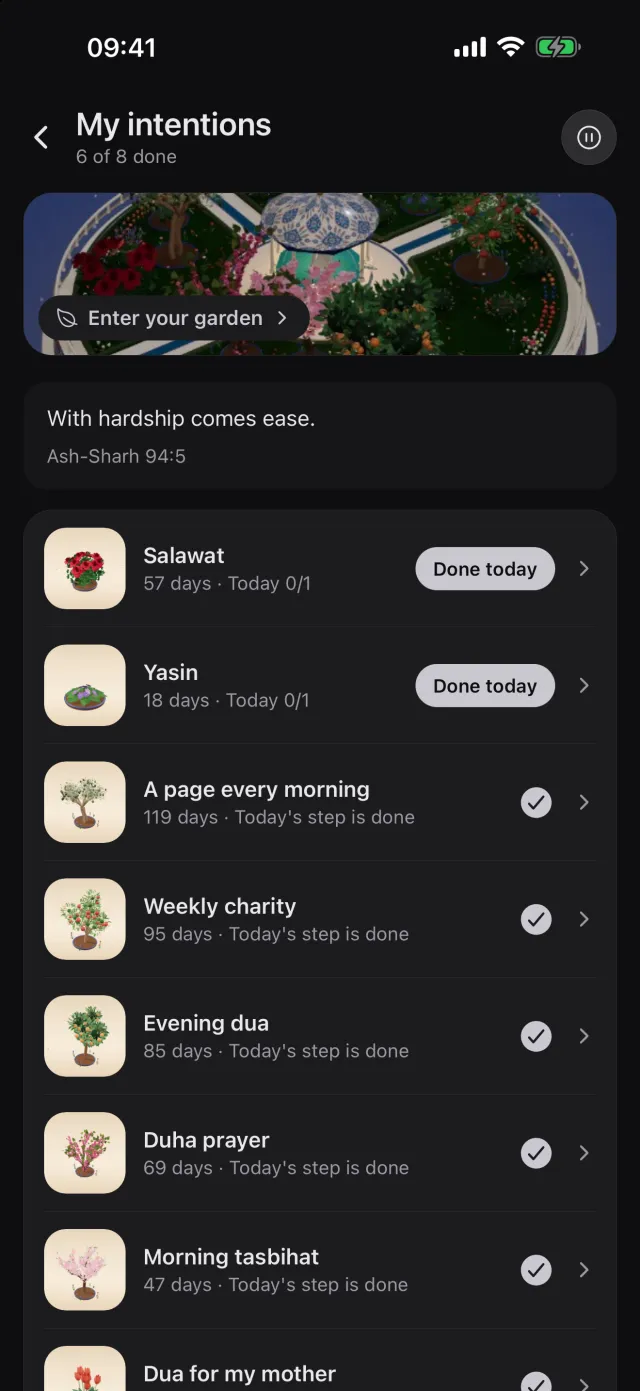
My intentions: the way into the garden 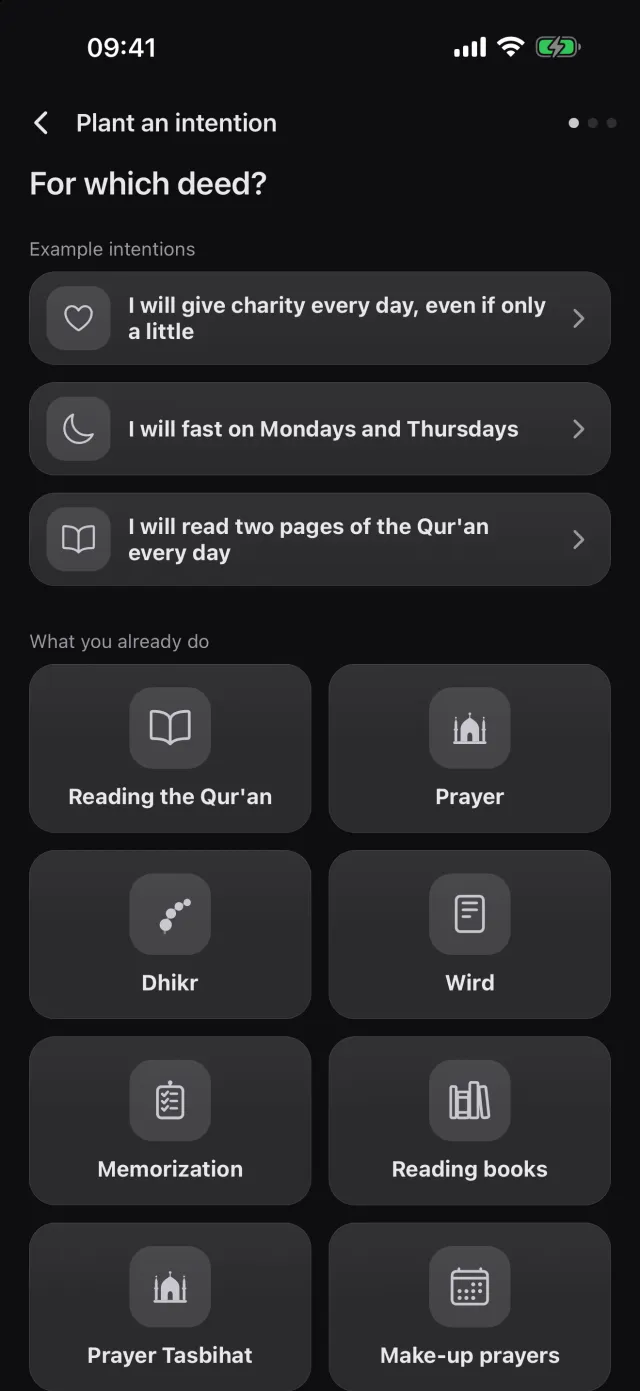
The first step of planting 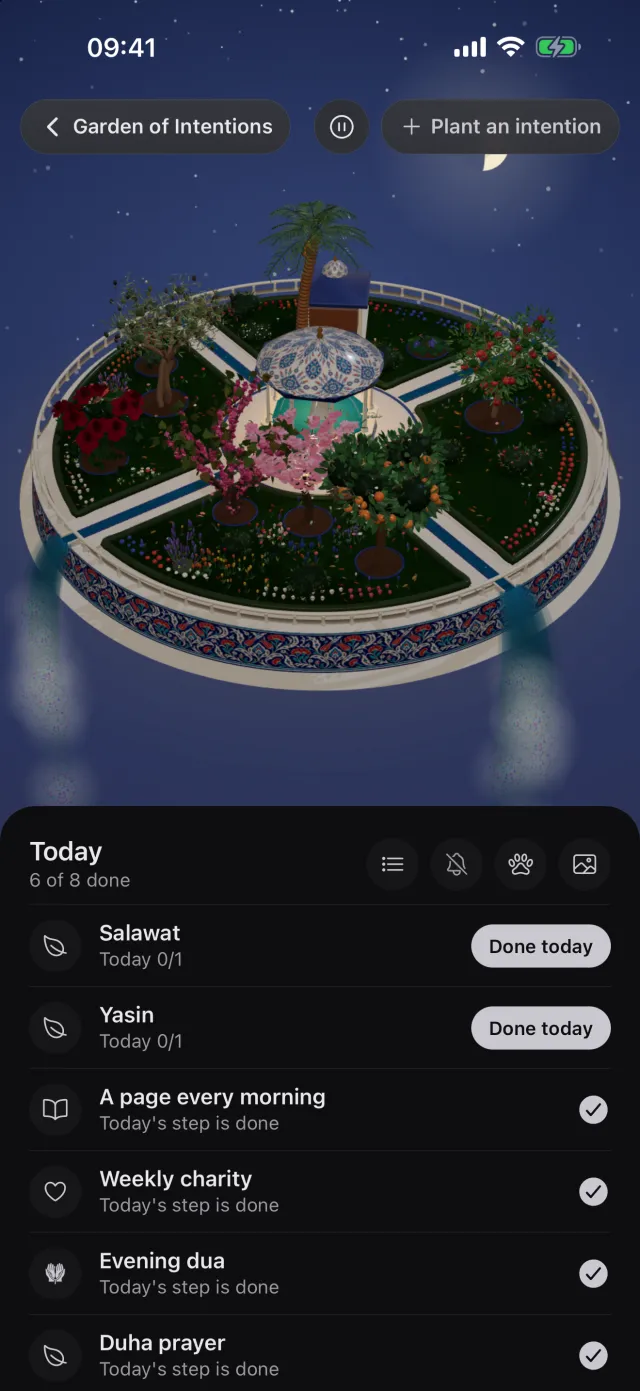
The garden and the Today list 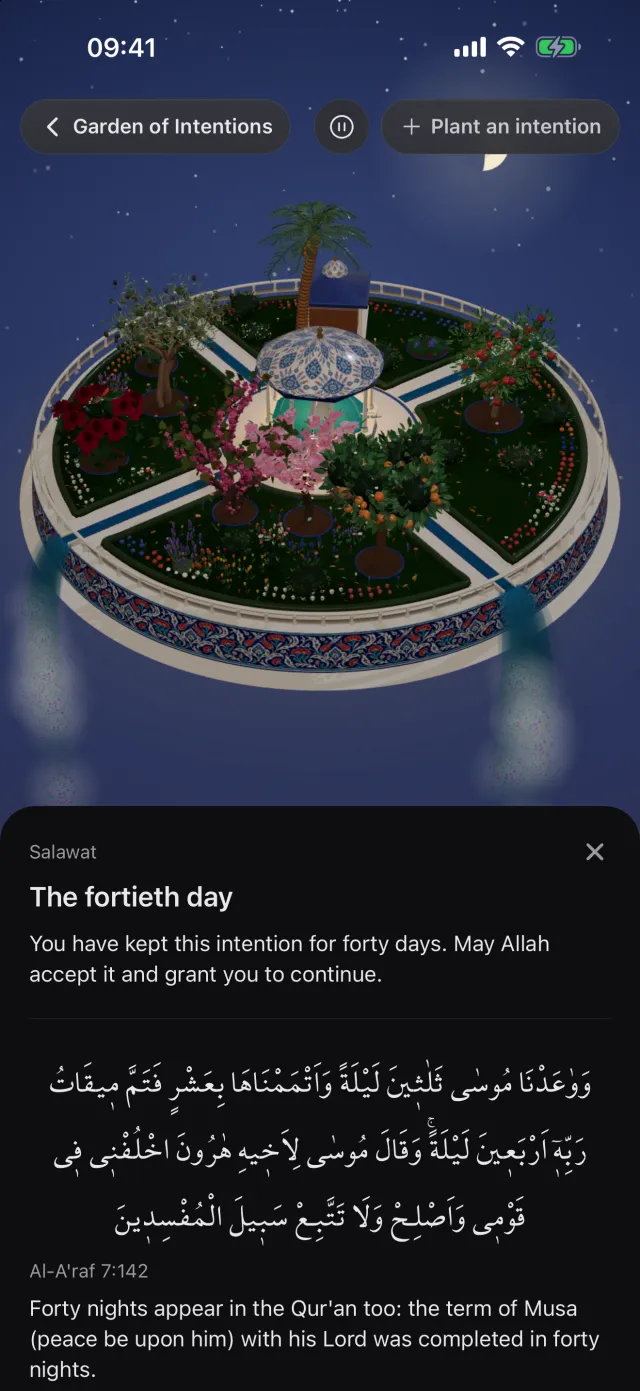
The fortieth day card
Frequently asked questions
Can other people see my garden?
Only you can see your garden. If you have an account, your garden syncs with it and comes along when you change phones. The sentences you write for your intentions and the names you give them reach your other devices only if you turn on Your written intentions.
If I miss a day, will my tree die?
It will not. It never loses its height; as you miss days it first droops, then fades, and after a very long gap it goes into winter. The day you take the minimum step, it comes back. For breaks you know about in advance, use Take a break; your plants do not fade at all on those days.
I read the Qur'an in the app. Do I need to mark it as well?
No. Intentions chosen under What you already do read your record in the app: pages you read in the reader, prayers you mark in My Prayers, dhikr you count on the counters. If you read from a printed mushaf, plant a Reading from a printed mushaf intention and mark it with Done today.
How many intentions can I plant?
The courtyard starts with room for ten saplings; as it fills, room for four more opens, then four more. Your garden holds up to eighteen saplings.
I picked the wrong sapling. Can I change it?
A planted sapling keeps its kind. Tap its tree, choose Remove from garden from the three dots on its card and plant it again. Your records in the tools (reading, dhikr, prayer) stay where they are.
Does it cost anything?
Planting, keeping and pausing intentions in the Garden of Intentions is free.
Plant your first intention
Download Manevi Halka for free and open the Garden of Intentions from the Read screen.