
Step-by-step guideNew
How to track qada prayers and make-up fasts
Make-up prayers and fasts is a private page for completing the prayers you missed and the fasts you could not keep, at your own pace. You enter the numbers once and mark them off one by one as you go. Only you see your records.
Each bead is one month's worth
Each row is one Ramadan, each bead one day
One prayer with the + next to its time, a whole day with one tap, and I fasted today for fasts.
In short
- Tap the prayer ring on the Home tab to open My Prayers. Then tap the Make-up prayers and fasts row further down.
- Tap Start and enter how many prayers of each time you have left. If you are not sure, Help me calculate gives you an approximate number.
- Enter the fasting days you missed on the same screen, choose your pace and tap Bismillah.
- When you pray a make-up prayer, tap the + next to its time. If you prayed several, use One day's make-up or I prayed a few.
- In My Prayers, the I prayed its make-up too button under a marked prayer records the make-up you prayed after the obligatory one with a single tap.
- On a day you keep a make-up fast, tap I fasted today on the Fasting tab. The history shows every entry and lets you correct it.
Set up your make-up page
Setup takes three short screens. You can correct the numbers whenever you like, so you do not need them to be exact the first time.
-
1
Open Make-up prayers and fasts from My Prayers
Tap the prayer ring on the Home tab and My Prayers opens. The round check-mark button at the top of the Prayer tab opens the same screen.
Below the day's prayer times, tap the Make-up prayers and fasts row. The first time, setup starts. The first screen tells you that this page is yours alone and that the numbers are an estimate. Tap Start.
9:41My PrayersTodayFajr06:17Dhuhr12:54Asr15:28Maghrib17:52Isha19:15Read the tasbihatMake-up prayers and fastsOne by one, at your own pace.Undo1 / 3Make-up prayers One by one, at your own pace.This page is yours alone. No one sees it, not even your circle.The numbers are an estimate. You can correct them any time.Whoever forgets a prayer, let him pray it when he remembers it; there is no expiation for it except that.Bukhari, Mawaqit 37; Muslim, Masajid 314Start -
2
Enter how many prayers of each time you have left
On the How many prayers of each time? screen, enter the number you know for Fajr, Dhuhr, Asr, Maghrib and Isha. I am making up witr too is switched on; turn it off if you do not want to include witr.
If you missed fasts, enter the number of days in the Make-up fasts box further down the same screen; otherwise leave it empty. You can set up prayers only, fasts only, or both. Then tap Continue.
9:412 / 3How many prayers of each time? Write what you know. You can correct it any time later.Help me calculate Make-up fasts The days of Ramadan you could not fast. Leave it empty if none.Fajr0Dhuhr0Asr0Maghrib0Isha0I am making up witr tooWitr0Make-up fasts0daysContinue -
3
Not sure of the number? Ask the calculation helper
Tap Help me calculate. Answer For how many years and months did you not pray? in years and months. If there were separate periods, add them with Add another period. An approximate number for each prayer time appears at the bottom; Use these numbers writes it into every prayer time.
There is also an optional Leave out special days setting for women. Fasts have their own helper: Help me calculate the fasts asks how many Ramadans you could not fast.
The helper only gives an estimate: it turns the period you enter into days and rounds up. You can ask a scholar about your own situation; the notes in the app suggest the same.
9:412 / 3How many prayers of each time? Write what you know. You can correct it any time later.Help me calculate Make-up fasts The days of Ramadan you could not fast. Leave it empty if none.Fajr0Dhuhr0Asr0Maghrib0Isha0I am making up witr tooWitr0Make-up fasts0daysContinueHelp me calculateFor how many years and months did you not pray?Period 1Add another periodYears0Months0Leave out special daysFor women, optionalFor each prayer time, about0Counted day by day and rounded up.Use these numbers2 / 3How many prayers of each time? Write what you know. You can correct it any time later.Help me calculate Make-up fasts The days of Ramadan you could not fast. Leave it empty if none.Fajr0730Dhuhr0730Asr0730Maghrib0730Isha0730I am making up witr tooWitr0730Make-up fasts0daysContinue -
4
Choose your pace and tap Bismillah
The When will you pray them? screen has three options: One after each obligatory prayer, Two a day and I will count myself. Depending on the pace you choose, an approximate time range appears below; no target date is set.
If you like, switch on Remind me and pick a time. The reminder avoids the disliked times for prayer and never shows a number or the word “make-up” on the lock screen. Then tap Bismillah.
At the end of setup you are asked once whether your make-up prayers should also grow as a sapling in your Garden of Intentions. The garden only reads; it never changes the numbers here. You can tap Not now and move on.
9:413 / 3When will you pray them?One after each obligatory prayerAfter the prayer of the time, one make-up of that same time.Two a dayA little, but every day.At this pace, about 2 to 3 years.I will count myselfNo pace; write them down whenever you pray.Remind meNever during the disliked times; the lock screen shows no numbers and no mention of make-up.Time20:30BismillahMake-up prayersOne by one, at your own pace.PrayerFastingMay Allah accept itLast entry: none yetCompleted 0 prayers The first month is under way 4,380 remaining, estimated
Each bead is one month's worthYear 1Year 2Fajr730leftDhuhr730leftAsr730leftMaghrib730leftIsha730leftWitr730leftOne day's make-upI prayed a fewUndoGrow it in your Garden of Intentions too?If you like, your make-up prayers can also grow as a sapling in your Garden of Intentions. The garden only reads; it never touches the numbers here.Not nowYes, plant a sapling
Mark them off one by one
At the top of the main screen you see how many prayers you have completed; below it, what is left for each prayer time. Every mark changes both numbers at once.
-
5
Prayed one? Tap the + next to its time
Each prayer time shows the number left and a + button. Tap the time of the make-up prayer you prayed: the number left goes down by one and Completed at the top goes up by one. If you tapped by mistake, use Undo on the bar that appears at the bottom.
In the row of beads on the top card, each bead is one month's worth. The beads fill as you pray, so you can see your progress without reading numbers.
The eye button at the top right hides the numbers, so you can open the screen comfortably when someone is next to you.
9:41Make-up prayersOne by one, at your own pace.PrayerFastingMay Allah accept itLast entry: yesterday 17:51, Fajr 2, Dhuhr 1Completed 1,381 prayers about 7 months' worth 1,859 remaining, estimated
Each bead is one month's worthYear 1Year 2Fajr300leftDhuhr316leftAsr323leftMaghrib316leftIsha308leftWitr296leftOne day's make-upI prayed a fewUndo -
6
Record a whole day or several at once
If you prayed one make-up of each of the five prayers, and of witr if it is on, tap One day's make-up; one of each is recorded.
If you prayed several together, tap I prayed a few. In the window that opens, choose the number for each prayer time, change when you prayed them if needed, and save. The number counts prayers, not days.
9:41Make-up prayersOne by one, at your own pace.PrayerFastingMay Allah accept itLast entry: yesterday 17:51, Fajr 2, Dhuhr 1Completed 1,381 prayers about 7 months' worth 1,859 remaining, estimated
Each bead is one month's worthYear 1Year 2Fajr300leftDhuhr316leftAsr323leftMaghrib316leftIsha308leftWitr296leftOne day's make-upI prayed a fewUndoI prayed a fewFajr0Dhuhr0Asr0Maghrib0Isha0Witr0When: TodayRecord make-ups you prayed together in one go. The number counts prayers, not days. Record 0 prayers -
7
In My Prayers: I prayed its make-up too
Once your make-up page is set up, the I prayed its make-up too button appears under every prayer you mark as prayed in My Prayers. If you prayed that time's make-up after the obligatory prayer, tap it. One make-up of that prayer is added to your page and the button changes to Make-up recorded too.
No need to open the make-up page: you record the make-up right where you mark the obligatory prayer.
A prayer time you have not marked is never added to your make-ups on its own.
9:41My PrayersTodayFajr06:17Make-up recorded tooDhuhr12:54I prayed its make-up tooAsr15:28I prayed its make-up tooMaghrib17:52I prayed its make-up tooIsha19:15I prayed its make-up tooRead the tasbihatMake-up prayers and fastsMade up: prayers 1,381 · fasts 11Undo -
8
On a make-up fasting day: I fasted today
Switch to the Fasting tab at the top. On a day you keep a make-up fast, tap I fasted today. Past days are chosen from the calendar with I fasted on a few days; the Eid days cannot be selected.
In the beads, each row is one Ramadan and each bead one day. If you like, switch on Remind me before Ramadan: you get one reminder in the month of Sha'ban.
9:41Make-up fastsOne by one, at your own pace.PrayerFastingLast entry: November 18Completed 11 days 19 days remaining, estimated
Each row is one Ramadan, each bead one dayI fasted today I fasted on a few daysRemind me before RamadanOnce, in the month of ShabanMake-up, kaffara and fidyaUndo
History and corrections
Every mark is saved with its date and time. A wrong entry does not spoil the numbers; it is easy to fix.
-
9
See and correct every entry in the history
Tap the Last entry line on the main screen and History opens. Entries are listed day by day with their times. Tap one to edit or delete it.
Change the numbers you entered at the start with Correct the numbers; the prayers you have already made up stay. If something went wrong, Go back to an earlier state takes you back to one of the last 30 states. You can also change your pace here.
9:41Make-up prayersOne by one, at your own pace.PrayerFastingMay Allah accept itLast entry: yesterday 17:51, Fajr 2, Dhuhr 1Completed 1,381 prayers about 7 months' worth 1,859 remaining, estimated
Each bead is one month's worthYear 1Year 2Fajr300leftDhuhr316leftAsr323leftMaghrib316leftIsha308leftWitr296leftOne day's make-upI prayed a fewUndoHistoryMake-up prayersThis month214 make-upsStarting number3,240TodayOne after each obligatory prayerAt this pace, about 1 year.ChangeYesterday08:10One day's make-up13:05DhuhrMonth 7 of make-up completed17:51Fajr 2, Dhuhr 121:40IshaCorrect the numbersGo back to an earlier stateThe last 30 states are kept on your device
What it looks like in the app
These screenshots come from the app itself.
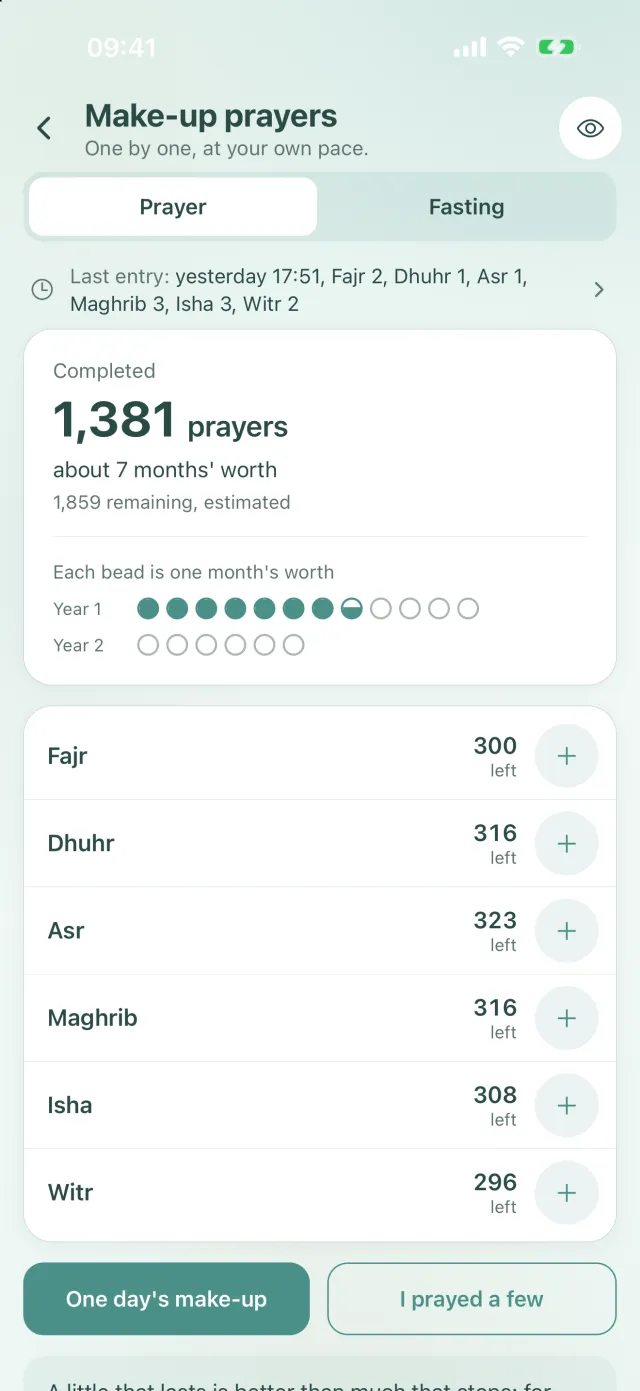
Make-up prayers: completed, left and the beads by year 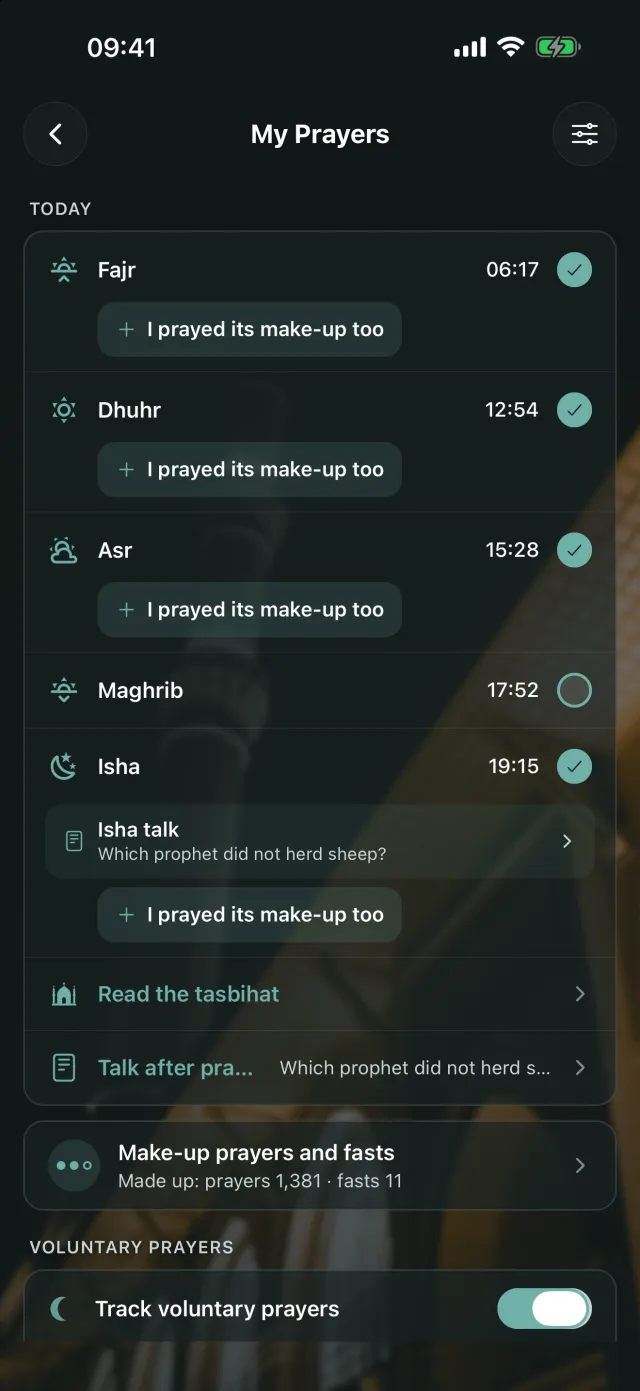
My Prayers: I prayed its make-up too and the make-up row
Frequently asked questions
Who can see my make-up records?
Only you. The make-up page is entirely private: your records stay on this phone and are kept separate from your circles. To hide the numbers on screen as well, tap the eye button at the top right.
Does the calculation helper tell me exactly how many prayers I owe?
No, it only gives an estimate. It turns the years and months you enter into days and rounds up. You can change the result as you like. You can ask a scholar about your own situation.
Do make-up prayers have to be prayed in order?
Scholars have answered this question, and the answer depends on your situation. For guidance that fits you, ask a scholar you trust. The app does not impose an order; you mark the prayer times in any order you like.
What happens if I change phones?
Your records are kept on this phone. On the new phone you set up the make-up page again and enter the numbers you have left. You can always correct them later with Correct the numbers.
Are kaffarah and fidyah counted too?
No, the fasting tab counts make-up fasts only. For the difference between make-up, kaffarah and fidyah, see the Make-up, kaffara and fidya note at the bottom of the fasting tab.
Is it free?
Yes. Make-up prayers and fasts is free.
Set up your make-up page today
Download Manevi Halka for free, open the make-up page from My Prayers and enter your numbers.